Translate
Translate text right in Poni. Type or paste it, press Ctrl+Enter, and the translation shows next to it. The AI you pick does the translating: Gemini, Claude, an OpenAI-compatible service, or Ollama.
Settings → Modules → Translate, then Settings → AI Chat & Translate
Setting it up
The Translate tab is off at first. Turn it on once, then choose its AI provider.
- Open Settings → Modules and tick Translate. A tab with a language icon appears in Poni.
- Open Settings → AI Chat & Translate and pick a provider in Translate uses. The default is Claude (Anthropic API).
- Fill in that provider's key or server on the same page. Keys are shared with AI Chat, so you only enter each one once. See AI Chat for how.
Already have a free Gemini key for AI Chat? Choose Google Gemini in Translate uses so Translate uses the same key.
How to use it
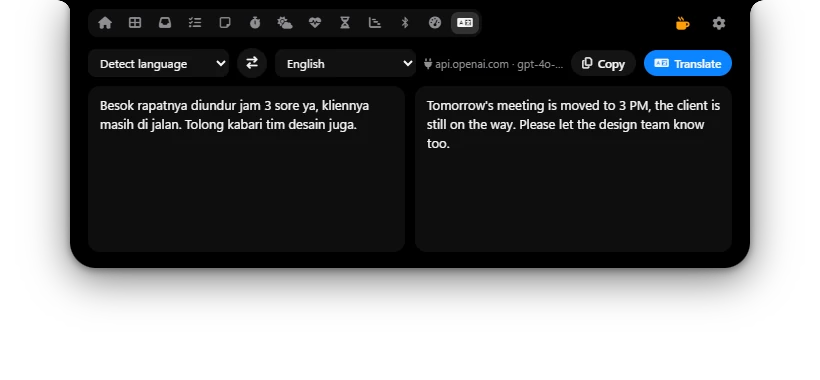
- Pick the source language in the top left box. Detect language lets the AI work it out.
- Pick the target language in the box next to it.
- Click the left text box and type or paste your text.
- Press Ctrl+Enter or click Translate. It shows Translating…, then the translation appears on the right.
- Click Copy to copy the translation.
The two-way arrow button between the languages swaps the direction and moves the translation into the left box, so you can translate it straight back. It does nothing while the source is Detect language.
The AI is told to keep the meaning, tone, formatting, line breaks, names and code, and to reply with the translation only, without notes.
Options
| Option | What it does |
|---|---|
| Source language | Detect language or one of 20 languages. Default: Detect language. |
| Target language | English, Indonesian, Javanese, Sundanese, Malay, Arabic, Chinese (Simplified), Japanese, Korean, Thai, Vietnamese, Hindi, French, German, Spanish, Portuguese, Italian, Dutch, Russian, Turkish. Default: English. Poni remembers your last choice. |
| Translate uses | In Settings → AI Chat & Translate: Google Gemini, Claude (Anthropic API), OpenAI-compatible API or Ollama (local, free). Default: Claude (Anthropic API). |
When it doesn't work
- Without a key, no API key shows in red next to the model name. For OpenAI-compatible it says no model set when the model is empty.
- Errors show in red in the right box. They're the same messages as in AI Chat, such as Invalid Gemini API key or Rate limited, try again in a moment. The fixes are in AI Chat.
The text you translate is sent to the provider you picked. Poni keeps no translation history. Use Ollama if the text must not leave your PC.