
Weather
The weather right now, an hourly forecast and the next 7 days for your city. The data comes from Open-Meteo, free and with no API key.
Settings → Weather
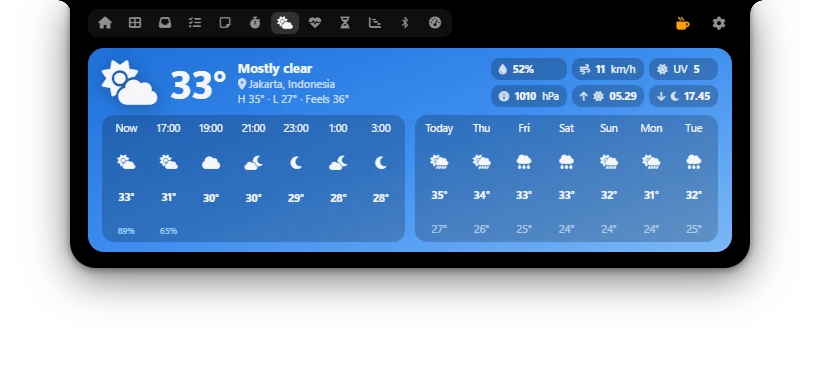
What the Weather tab shows
- Now: temperature, conditions, the city, today's high (H) and low (L), and what it feels like (Feels).
- Details: humidity, wind speed, UV index, air pressure (hPa), sunrise and sunset.
- Hourly: starts with Now, then every 2 hours. The chance of rain shows under the temperature when it is 20% or more.
- 7 days: Today and the next 6 days, with highs and lows.
The background follows the weather and turns dark at night. Poni updates the data every 15 minutes. If the data is more than 30 minutes old when you open the tab, Poni fetches fresh data right away.
Choosing your city
On first start Poni guesses the city from the Windows time zone. For example, the Western Indonesia zone starts with Jakarta. If you live somewhere else, change it:
- Open Settings → Weather.
- In the Location row, type a city in the Search a city… box, for example
Surabaya. - Press Enter or click the magnifier button.
- Click the right city in the results. Each result shows its region and country, so you can tell cities with the same name apart.
The weather updates for the new city right away. If Poni has no city at all, the Weather tab shows Pick a city in Settings → Weather and a Choose city button that opens this page.
Prayer Times uses the same city as Weather unless you pick a separate city for prayers. So after you change the city here, the prayer times follow. See Prayer Times.
Options
| Option | What it does |
|---|---|
| Show weather | Fetches the weather. When off, Poni stops fetching the forecast. The tab stays; to hide it, turn Weather off in Settings → Modules. Default: on. |
| Location | The city for the weather. Search, then click the city. Default: guessed from the Windows time zone. |
| Units | °C, km/h or °F, mph, for temperature and wind speed. Default: °C, km/h. |
Dashboard widget
The Weather widget is on the Dashboard from the start. It shows the city, temperature, conditions and today's high and low. Click it to open the Weather tab. You can move or replace it in Settings → Dashboard (see Dashboard).
Weather in the closed Poni New
While nothing else is going on, the closed Poni can show a weather icon and the temperature on its left or right. Open Settings → General → Closed Poni and choose Weather for Left side or Right side. Music, timers and alerts still take that spot when they come. See The closed Poni.
Only your city's coordinates are sent to Open-Meteo, not your PC's location. The city search needs at least 2 letters.