
Pomodoro
A timer that switches between focus and breaks. You focus for one session, take a short break, and after a few sessions a longer one. The countdown stays visible in the closed notch.
Pomodoro tab · Settings → Pomodoro
How to use it
- Open the Pomodoro tab.
- Click the big play button. A focus session starts, 25 minutes by default.
- Work on one thing until the time is up. Poni chimes and says Focus done! Take a break.
- A short break starts right away, 5 minutes by default. When it ends, Poni says Break over, back to focus.
- Click play again for the next focus session.
- After 4 focus sessions you get a long break, 15 minutes by default.
The timer runs in the background. Closing Poni or switching tabs doesn't stop it.
What's in the Pomodoro tab
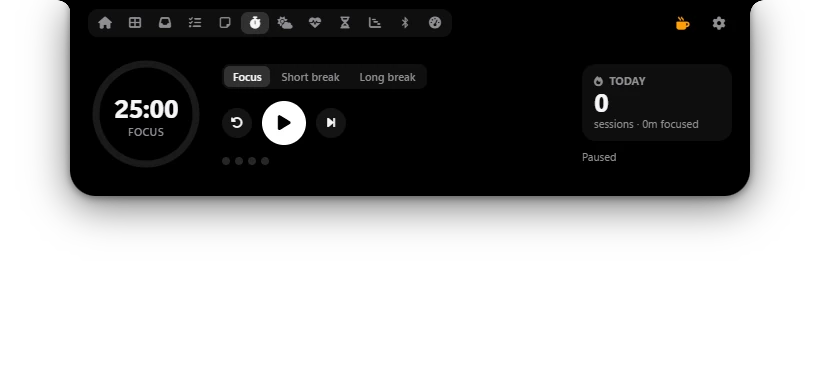
- The ring: time left and the current phase. Orange for Focus, green for Short break, light blue for Long break.
- Focus, Short break, Long break: click one to switch to that phase. The timer stops and the phase starts over.
- Reset (curved arrow): stops the timer and restarts the current phase from the beginning.
- Start / pause (the big button): starts or pauses. When paused, the time left is kept.
- Skip: ends the current phase and moves to the next one. A skipped focus doesn't count as a session; only the minutes it ran are added to today's focus time. The next phase starts by itself if its automatic option is on.
- The dots: focus sessions done before the next long break.
- The Today card: today's focus sessions and total focus time, like 3 and sessions · 1h 15m focused.
- Under the card: Ends at 14:25 while running, or Paused.
The countdown in the closed Poni
While the timer runs, the closed Poni shows a small progress ring, Focus or Break, and the time left, like 18:42. If music or other activities are going on too, they take turns. When the timer is paused, the countdown goes away.
When a phase ends, its message shows in Poni for a few seconds, with a sound if Completion sound is on. To hide the countdown in the closed Poni, turn off Pomodoro timer in Settings → Live Activities. See The closed Poni.
Add the Pomodoro widget to the Dashboard to start and pause the timer without switching tabs. See Dashboard.
Options
| Option | What it does |
|---|---|
| Focus | Length of one focus session, 5 to 90 minutes. Default: 25 minutes. |
| Short break | Length of a short break, 1 to 30 minutes. Default: 5 minutes. |
| Long break | Length of a long break, 5 to 60 minutes. Default: 15 minutes. |
| Focus sessions before a long break | How many focus sessions come before a long break, 2 to 8. Default: 4. |
| Start breaks automatically | A break starts right after a focus session ends. With it off, click play to start the break. Default: on. |
| Start focus automatically after a break | The next focus session starts right after a break. Default: off. |
| Completion sound | A short sound when a focus session or break ends. Default: on. |
New lengths apply right away when the timer isn't running; the time left in the current phase is replaced with the new length. If the timer is running, that phase ends as planned and the new lengths apply from the next phase.
Starting Pomodoro with AI Chat New
You can also ask AI Chat, for example “start a focus session”, “I need a break” or “stop the pomodoro”. See AI Chat.