
Day Progress
One timeline for today, from when you wake up to bedtime, with your calendar events and the tasks you finished. One look tells you how much of the day is left.
Settings → Day Progress
What the Day Progress tab shows
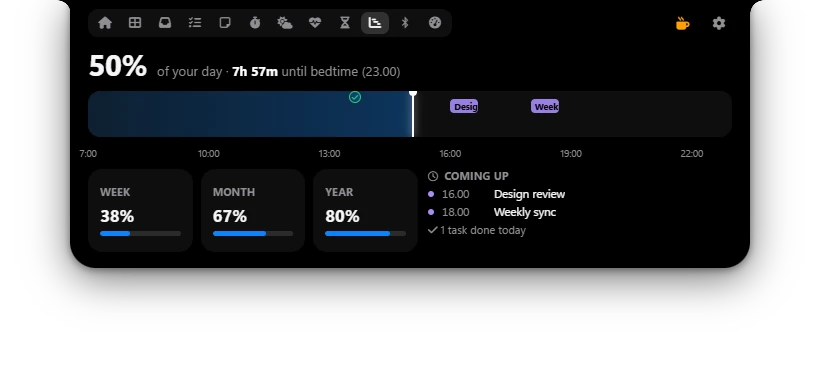
- Day percentage: how much of your day has passed, the time left until bedtime, and your bedtime.
- Timeline: the blue part is time that has passed, the white line is now. Colored blocks are calendar events (hover to see the title). Check marks are Todo tasks you finished, placed at the time you ticked them. Hour labels run below it every 3 hours.
- Week, Month, Year: how much of this week (starting Monday), this month and this year has passed.
- Coming up: up to 4 more events today, and how many tasks you finished today.
The tab updates every 30 seconds. After bedtime, Poni says past bedtime, get some rest.
Setting your wake and bed times
- Open Settings → Day Progress.
- Set Day starts to the time your day begins, for example 06:00.
- Set Bedtime to when you go to sleep, for example 22:30.
For example, with the default 07:00 to 23:00, at 15:00 your day is 50% done and Poni shows 8h 0m until bedtime. A bedtime after midnight works too: if you set 01:00, Poni counts it as 1 a.m. the next day.
Options
| Option | What it does |
|---|---|
| Day starts | When your day begins, the start of the timeline. Default: 07:00. |
| Bedtime | When you go to bed, the end of the timeline. Default: 23:00. |
Events come from Calendar (iCal links and local events), and the check marks from Todo. The more you use them, the more useful the timeline gets.
Dashboard widget
The Day progress widget is on the Dashboard from the start. It shows the day percentage, a bar and the time left until bedtime. Click it to open the Day Progress tab. Change widgets in Settings → Dashboard.