Health
Three daily rings for breaks, water and mindful minutes, plus break reminders and 20-20-20 eye breaks. All of it stays on this PC.
Settings → Health
The three rings
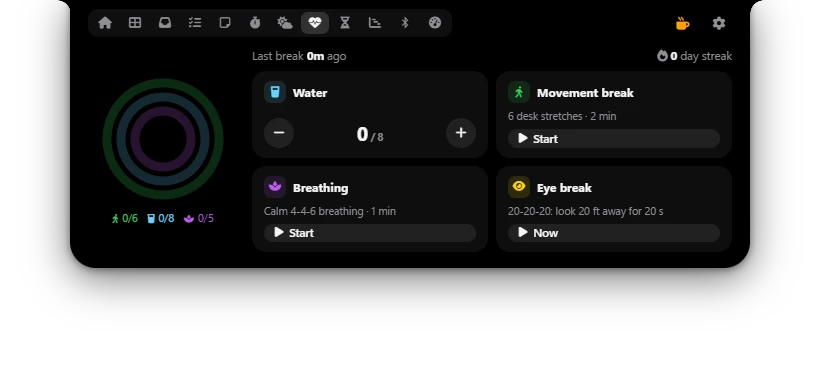
The left side of the Health tab has three rings. Each one fills up when you reach that day's goal:
- Green, breaks: how many breaks you took, for example 2/6.
- Blue, water: how many glasses you drank, for example 5/8.
- Purple, mindful minutes: minutes of breathing practice, for example 1/5.
Above them you see Last break … ago and … day streak: how many days in a row you reached both the water and the break goal. The mindful goal doesn't count for the streak.
Filling the rings
- Water: click + after each glass. Clicked by mistake? Press −.
- Automatic breaks: when you leave the PC for 5 minutes (no mouse or keyboard), Poni logs a break when you come back. Locking the PC (Win + L) or putting it to sleep counts too if it lasts at least 2 minutes, once you're back.
- Movement break: click Start for 6 desk stretches of 20 seconds each (about 2 minutes): Neck rolls, Shoulder shrugs, Chest opener, Seated twist, Wrist stretch and Stand & walk. Follow the steps on screen. When it ends, Poni logs a break.
- Breathing: click Start for one minute of breathing. Follow the circle: breathe in for 4 seconds, hold for 4, breathe out for 6, hold for 2. When it ends, the purple ring gets 1 minute.
- Eye break: click Now to start an eye break right away.
If you press End during a stretch or breathing session, it stops and isn't logged. A session that's running keeps going even if you close Poni.
Break reminders
With Remind me to take a break on, Poni shows Time for a break with a short chime after you've worked without a pause for the time you set (50 minutes by default). If you still don't take a break, the reminder comes back after 15 minutes at the earliest.
The count starts over after you leave the PC for 5 minutes, lock the PC for at least 2 minutes and come back, or finish a Movement break.
20-20-20 eye breaks
The rule: every 20 minutes, look at something 20 feet (about 6 metres) away for 20 seconds. Turn on 20-20-20 eye breaks (off by default). After you've used the PC for Eye break every (20 minutes by default), the screen dims on every monitor and counts down for Eye break length (20 seconds by default). Look into the distance and let your eyes relax.
Want to skip it? Click Skip or press Esc. Time away from the PC doesn't count, and after a break the count starts over.
Options
| Option | What it does |
|---|---|
| Track health | Notices when you step away from the PC and runs the break reminders and eye breaks. When off, Poni no longer watches for time away from the PC, and break reminders and eye breaks don't come. Default: on. |
| Water goal | Glasses of water per day, 2 to 16. Default: 8 glasses. |
| Break goal | Breaks per day, 1 to 16. Default: 6 breaks. |
| Mindful minutes goal | Mindful minutes per day, 1 to 30. Default: 5 min. |
| Remind me to take a break | Reminds you to pause after working for a long stretch. Default: on. |
| After working continuously for | How long you work without a pause before the reminder, 15 to 120 minutes. Default: 50 min. |
| 20-20-20 eye breaks | Regular eye breaks that dim the screen. Default: off. |
| Eye break every | Time between eye breaks, 10 to 60 minutes of use. Default: 20 min. |
| Eye break length | How long an eye break lasts, 10 to 60 seconds. Default: 20 s. |
Dashboard widget
Choose Health rings in Settings → Dashboard to see small rings and your water, break and mindful counts on the Dashboard. Click the widget to open the Health tab.