A free Dynamic Island-style notch for Windows.
Poni turns the top of your Windows 10 or 11 screen into an interactive notch, like Dynamic Island on the iPhone or the notch on a MacBook. Free, no ads, no account, made by an independent developer in Indonesia.
Windows 10 & 11 (64-bit) · about a 5 MB installer · Mac & Linux (Beta)
What is Poni?
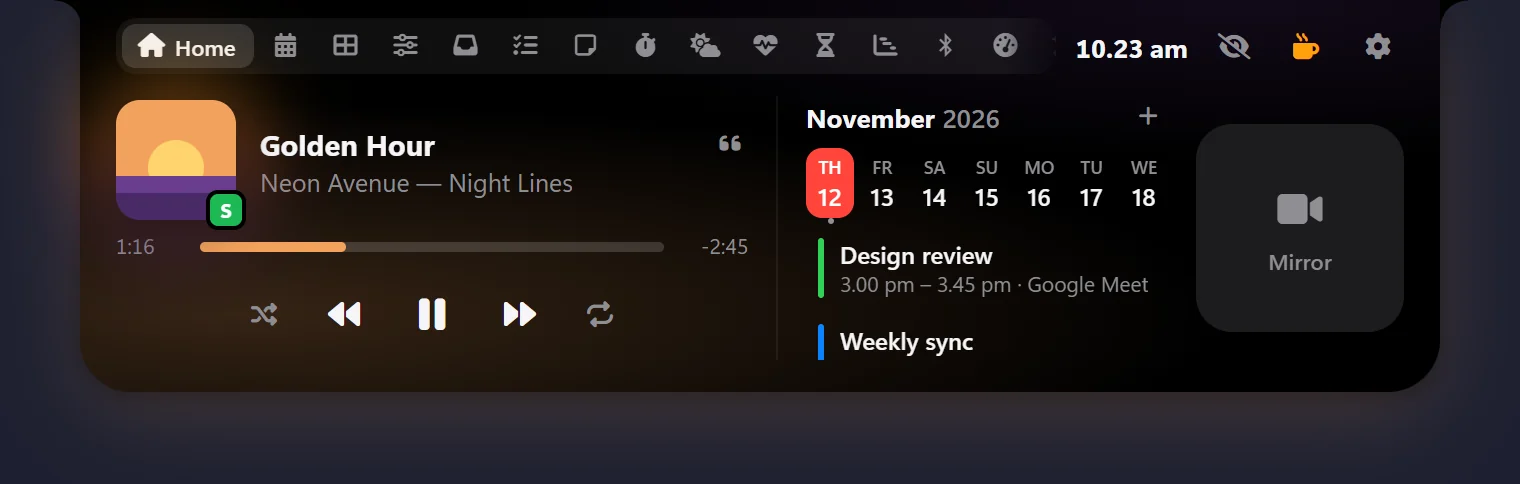
Poni is a free app that lives at the top of your screen. Closed, it's a small notch showing the time, the song that's playing, or a countdown to your next meeting or task. Move the mouse up and it opens with your music, calendar, weather, to-dos, AI Chat and the files you use most.
Poni is made by Alim AJ of Bos Digital, an independent developer in Indonesia, and thousands of PCs use it every day (see the live numbers).
What people use it for
- Synced lyrics right in the notch, following the song. Korean, Japanese and Chinese lyrics can show in Latin letters or translated. Works with Spotify, YouTube in a browser and other players.
- Notifications from WhatsApp, mail and other apps under the notch, and a click opens the app.
- A Mac-style Dock that can stand in for the Windows taskbar: magnifying icons, five styles, and windows that come out of their icon.
- To-dos you can type in everyday words like "tomorrow 3pm" or "every Mon 9am", with reminders in the notch.
- AI Chat with Gemini (a free API key from Google AI Studio), Claude, any OpenAI-compatible API or Ollama, which can add reminders and notes for you.
- Prayer times from your local authority, with a countdown in the notch and an adhan from your own recording.
- Shelf for files you drop on Poni, a clipboard history, and files from your phone on the same Wi-Fi.
- Buddy: a 3D cat, dog or owl that watches your mouse and chats with you.
- Pomodoro, water reminders, weather, Google and Outlook calendars, PC stats, a world clock, a teleprompter and more.
Why Poni
- Free, with no ads and no account. If it helps you, you can support the developer on PayPal.
- Your settings, to-dos and notes stay on your PC.
- Light: about a 5 MB installer, using the WebView2 that comes with Windows instead of bundling a browser.
- Signed automatic updates, in English, Indonesian and several other languages.
How to install
- Click Download free on poni.web.id, or get
Poni_x.y.z_x64-setup.exefrom GitHub Releases. - Run the installer. If Windows SmartScreen shows up, click More info and then Run anyway: Poni doesn't have a paid code-signing certificate yet, and every update is signed.
- Move the mouse to the top middle of the screen and Poni opens. Everything is set from the gear button.
Every feature is explained in the Poni guide.
Questions people ask
Is Poni free?
Yes. Poni is free, with no ads and no account. If it helps you, you can support the developer through PayPal or QRIS.
Who makes Poni?
Alim AJ of Bos Digital, an independent developer in Indonesia. The installers, release notes and translation files are on GitHub (liimalim/Poni).
Is Poni the same as Dynamic Island?
Dynamic Island is an iPhone feature by Apple. Poni brings a similar idea to Windows: a notch at the top of the screen that grows when it has something to show. Poni isn’t made by or connected with Apple.
Does Poni work on Windows 10?
Yes. Poni runs on 64-bit Windows 10 and 11 with Microsoft Edge WebView2, which comes with Windows 11 and up-to-date Windows 10.
Is there a Mac or Linux version?
Yes, as a Beta. Some Windows-only parts, like the Dock, Snap Zones and the Wi-Fi and Bluetooth lists, aren’t there yet.
Where does my data go?
Nowhere: settings, to-dos and notes stay on your PC. Poni only goes online for the features you use, like weather, prayer times, lyrics and AI Chat, and the privacy page lists every one.
On a Mac or Linux? Get the Beta here.